
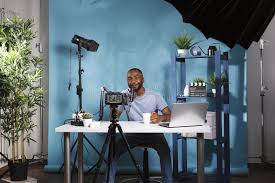
Setting up a professional video blogging studio in involves careful consideration of equipment, room acoustics, lighting, and budget. This guide walks you through the essential elements for creating a high-quality home studio environment to elevate your video content.
What Makes a Video Studio “Professional”?
A professional video studio isn’t just about fancy equipment. It’s about the final product. It’s about how your videos sound. It’s about how they look. Good audio means people can actually hear you clearly. Great lighting makes you and your subject look their best. A well-designed space also helps you work better. It can make filming more efficient. It can also boost your confidence. When you know your setup is solid, you can focus on your message. You can really connect with your audience.
This also means avoiding common amateur mistakes. You know, that echoey sound? Or shadows that make you look tired? Professional studios fix these things. They use smart choices. These choices make a big difference. Your viewers will notice. They will feel more engaged. They will trust your content more. This is key for growing your audience. It’s also key for building your brand.
My Own Studio Setup Struggle
I remember my first attempts at making videos. It was rough. I used my laptop camera. The audio was awful. It was full of background noise. My apartment was small. Every little sound seemed to get picked up. My neighbors walking by. The refrigerator humming. Even the dog next door barking. It made my videos sound so unprofessional. I felt embarrassed to share them.
Then came lighting. I tried using a desk lamp. It cast weird shadows. It made my face look uneven. Sometimes I was too bright. Sometimes I was too dark. It was a constant battle. I spent hours editing. I tried to fix the audio and video. It was frustrating. I almost gave up. But I really wanted to share my passion. I knew I needed a better setup.
Essential Gear for Your Vlogging Studio
Let’s talk about the core items. These are the things you’ll need to get started. Think of them as your building blocks. We’ll cover cameras, microphones, and lighting.
Cameras: Beyond Your Phone
While your phone camera is great for quick clips, a dedicated camera offers more control.
Webcams: For live streaming or simple recordings, a good HD webcam is a solid start. Look for models with good low-light performance. Brands like Logitech and Razer offer popular choices.
DSLR/Mirrorless Cameras: These offer the best quality and flexibility. They have larger sensors for better images. They also allow for interchangeable lenses. This means you can change your look. Popular brands include Canon, Sony, and Nikon. Many entry-level models are great for vlogging studios.
Camcorders: These are designed specifically for video. They often have good built-in audio and ease of use.
When choosing, consider your budget. Think about what you’ll be filming. Do you need portability? Or is a fixed studio setup okay? Most cameras today shoot in Full HD (1080p). Many also shoot in 4K. 4K offers more detail. It gives you room to zoom in during editing.
Microphones: Sound Quality is King
Bad audio is a sure way to lose viewers. Invest in a good microphone.
USB Microphones: These plug directly into your computer. They are easy to set up. They are great for voiceovers and talking-head videos. Blue Yeti and Rode NT-USB are popular choices. They offer clear sound.
Shotgun Microphones: These are directional. They pick up sound from the front. They help reduce background noise. You can mount them on your camera. Or use them on a boom arm. Rode VideoMic and Sennheiser MKE series are well-regarded.
Lavalier Microphones (Lapel Mics): These clip onto your clothing. They offer consistent sound. They are great for when you move around. Wireless lav mics give you freedom. Rode Wireless GO and DJI Mic are modern options.
Always think about your recording space. In a smaller room, a USB mic might be perfect. If you have more space and movement, a shotgun or lav mic might be better. Your microphone is arguably more important than your camera. Clear audio keeps people watching.
Microphone Placement Tips
Get Close: For most mics, closer is better. This boosts your voice. It lowers room noise.
Direction Matters: Understand your mic’s pickup pattern. Point it at your mouth.
Avoid Bumps: Use a shock mount. This stops vibrations from reaching the mic.
Test, Test, Test: Always do a sound check before you record.
Lighting: Illuminate Your Best Self
Good lighting makes a huge difference. It makes your videos look polished. It can hide imperfections. It makes your subject pop.
Ring Lights: These are popular for a reason. They provide even, soft light. They reduce shadows. They are often affordable. They are great for close-ups.
Softboxes: These are light sources inside a diffusion material. They create soft, broad light. This is very flattering. They are often used in sets of two or three. They can be larger than ring lights.
LED Panels: These are versatile. Many have adjustable brightness and color temperature. You can change the mood. They can be mounted on stands.
The “rule of thirds” for lighting is a good starting point. Place one light as your key light. This is the main light source. Place another as a fill light. This softens shadows. A third light can be a back light. This separates you from the background.
Acoustics: Taming Your Room’s Echo
This is where many beginners get stuck. A great camera and mic mean nothing if your room sounds bad. Your room’s shape and surfaces affect sound. Hard surfaces like bare walls, windows, and floors reflect sound waves. This causes echo and reverb.
Why Echo is the Enemy
Echo makes your voice sound distant. It makes it hard to understand. It can sound amateurish. Even the best microphone can’t fix a bad-sounding room. You want a “dry” sound. This means minimal reflections.
Simple Solutions for Better Sound
You don’t need a professional studio to fix acoustics.
Soft Furnishings: Add rugs, carpets, and curtains. These absorb sound. Upholstered furniture also helps a lot.
Bookcases: Shelves filled with books are natural sound diffusers. They break up sound waves.
Wall Hangings: Tapestries, thick blankets, or acoustic panels can absorb sound.
Record in a “Dead” Room: A closet full of clothes can be surprisingly good. Or a room with lots of soft items.
Acoustic foam panels are a common sight in studios. They are effective. You can buy them online. Place them strategically on walls. Especially on the wall behind your camera. Or on the wall facing you.
Acoustic Treatment Levels
Level 1 (Easy): Use soft items already in your home. Rugs, curtains, sofas.
Level 2 (Moderate): Add acoustic panels. Use blankets strategically.
Level 3 (Advanced): Bass traps for low frequencies. Professional studio design.
Lighting Strategies for a Professional Look
Let’s dive deeper into lighting. It’s more than just making things bright. It’s about shaping the mood. It’s about making your subject look good.
The Three-Point Lighting Setup
This is a foundational technique used in film and video.
Key Light: This is your main light. It should be the brightest. It typically shines from the side of your subject. About 45 degrees off-center.
Fill Light: This light fills in the shadows created by the key light. It’s less intense than the key light. It’s usually placed on the opposite side.
Back Light (Hair Light or Rim Light): This light shines from behind your subject. It creates a subtle glow around their head and shoulders. This separates them from the background. It adds depth.
Experiment with the intensity and position of each light. The goal is to create dimension. You want to avoid a flat, boring image.
Color Temperature Matters
Lights have a color temperature. It’s measured in Kelvin (K).
Daylight: Around 5000K-6500K. This looks cool and blueish.
Tungsten (Incandescent): Around 2700K-3200K. This looks warm and yellowish.
Many modern LED lights allow you to adjust this. You want your light temperature to match your environment. Or your creative intent. For a natural look, aim for something close to daylight. If you want a warm, cozy feel, use warmer lights.
DIY Lighting Hacks
Bounce Light: Use white poster board or a sheet. Bounce your main light off it. This creates a softer fill light.
DIY Softbox: Use a cardboard box. Cover it with white diffusion paper. Place your light inside.
Window Light: On a cloudy day, a large window can be a great key light. Diffuse it with sheer curtains.
Choosing Your Studio Space
Where you film matters a lot. Think about the practicalities of your home.
Room Size and Shape
A large, open room is generally better for acoustics. It has more space for sound waves to dissipate. Small, square rooms are often the hardest to treat. They can create more problematic echoes. If you have a small space, focus on sound absorption.
Backgrounds and Aesthetics
What will be seen behind you?
Clean and Tidy: A simple, uncluttered background looks professional.
Themed Backgrounds: If your content has a theme, your background can reflect that. Think books, plants, or props.
Green Screen: This allows you to add any background in post-production. Ensure even lighting on the screen. Avoid shadows.
Consider the color of your background. Darker backgrounds can make you stand out more. Lighter backgrounds can feel more open and airy.
Background Noise Considerations
Think about the typical noises in your chosen space. Is it near a busy street? Is it next to a noisy appliance? Try to choose a room that is as quiet as possible. Especially during the times you plan to film. Consider recording during quieter hours.
Studio Space Checklist
Power Outlets: Enough for all your gear?
Natural Light: Can you control it? (Blinds/curtains)
Ventilation: Lights and equipment can get warm.
Space for Gear: Room for lights, mic stands, camera, tripod.
Comfort: Will you be comfortable filming for extended periods?
Budget-Friendly Studio Builds
You don’t need to spend a fortune. Start with the essentials. Upgrade as you grow.
Prioritize Audio and Lighting
If you have to choose, spend more on your microphone and lights first. Viewers will tolerate less-than-perfect video quality for a bit. They will leave if the audio is bad or the lighting is harsh.
Smart Shopping Strategies
Buy Used Gear: Check reputable online marketplaces for used cameras, lights, and microphones.
Bundles and Kits: Many companies offer starter kits that combine essential gear. These can be more cost-effective.
DIY Solutions: As mentioned, many acoustic and lighting solutions can be built yourself.
Rent Equipment: For special projects, consider renting higher-end gear.
Budget Breakdown Example (Entry-Level)
Camera: Good Webcam ($100-$200) or Used DSLR ($300-$500)
Microphone: USB Mic ($100-$150)
Lighting: Ring Light Kit ($50-$100)
Acoustic Treatment: DIY/Soft Furnishings ($0-$50)
Tripod: ($30-$60)
Camera Stability and Support
A shaky camera is a distraction. You need stable support.
Tripods: Essential for static shots. Look for one that is sturdy. It should have a smooth pan and tilt head.
GorillaPods/Flexible Tripods: These can wrap around objects. They are great for unique angles.
Camera Mounts/Arms: For permanent studio setups, consider boom arms. These can hold lights or microphones above your shooting area.
Ensure your tripod is tall enough for your needs. Or that you have ways to adjust camera height.
Putting It All Together: Your Studio Plan
Let’s imagine you have a spare room or a dedicated corner.
1. Assess the Space: What are its challenges? Echo? Light? Noise?
2. Prioritize Gear: What can you afford now? What can you add later? Focus on good audio and lighting first.
3. Treat the Acoustics: Add soft materials. Consider acoustic panels if needed.
4. Set Up Lighting: Start with a basic key and fill light. Or a good ring light.
5. Position Your Camera: Use a tripod for stability. Frame your shot.
6. Test Everything: Record a short test. Listen to the audio. Watch the video. Make adjustments.
It’s an iterative process. You will learn what works best for you. Don’t aim for perfection on day one. Aim for improvement.
Real-World Studio Scenarios
The Small Apartment Dweller: You might use a corner of your living room. Focus on a strong USB mic. Use curtains and a rug to tame echoes. A ring light might be all you need for flattering light. Your background might be a clean wall with a plant.
The Dedicated Home Office: You have a spare room. You can set up permanent lighting and acoustic panels. You might invest in a DSLR or mirrorless camera. A shotgun mic on a boom arm could work well. You have more freedom with background choices.
The Basement Studio: Basements can be great for sound control. They are often more isolated. They might need more work on lighting. Ensure good ventilation.
What This Means for Your Videos
A professional setup directly impacts your viewers’ experience.
Increased Engagement: Clear audio and pleasing visuals keep people watching.
Enhanced Credibility: A polished look builds trust in you and your message.
Better Storytelling: When technical issues are gone, you can focus on connecting.
Growth Potential: High-quality content attracts more viewers and subscribers.
When to Worry (and When Not To)
Echo/Reverb: If your voice sounds like you’re in a bathroom, that’s a problem. Minor room tone is normal.
Harsh Shadows: If your face is half in shadow, your lighting needs work. Soft, even light is best.
Background Noise: Loud distractions that overpower your voice need to be minimized.
Most “flaws” can be addressed with simple adjustments. Don’t let them stop you from creating.
Quick Tips for Studio Success
Use a Pop Filter: This attaches to your mic. It stops “plosive” sounds (like P and B) from creating a harsh pop.
Cable Management: Tidy cables look professional. They also prevent tripping hazards. Use zip ties or cable sleeves.
Test Recording Environment: Record a few minutes of silence. Play it back. Listen for any hums or buzzes from your equipment.
Backup Gear: For critical shoots, consider having a backup microphone or camera.
Frequent Questions About Vlogging Studios
What is the most important piece of equipment for a vlogging studio?
Most experts agree that the microphone is the most important piece of equipment. Clear audio is essential for keeping viewers engaged. Viewers will often forgive less-than-perfect video quality if the sound is good, but the reverse is rarely true.
How much does a professional vlogging studio cost?
Costs vary widely. You can set up a basic home studio for a few hundred dollars. For a more advanced setup with professional cameras, multiple lights, and acoustic treatment, costs can range into the thousands.
Start with your budget and needs in mind.
Do I need a special room for a vlogging studio?
Not necessarily. You can set up a functional vlogging studio in a spare bedroom, a quiet corner of your living room, or even a large closet. The key is to manage acoustics and lighting effectively within the space you have.
What kind of lighting should I use for my studio?
For a flattering look, soft, diffused lighting is best. Popular options include ring lights, softboxes, and LED panels. A three-point lighting setup (key, fill, and back light) is a standard professional technique.
How can I improve the sound in my studio without spending a lot?
Adding soft furnishings like rugs, curtains, and upholstered furniture helps absorb sound. Bookcases filled with books also act as diffusers. Even hanging thick blankets on the walls can make a noticeable difference in reducing echo.
Should I use a green screen for my vlogging studio?
A green screen is optional. It’s useful if you want to add custom backgrounds or virtual sets in post-production. If you choose to use one, ensure it’s lit evenly and without shadows for the best results.
Conclusion
Creating your own professional video studio is an exciting journey. It’s about more than just gear; it’s about understanding how to use it. Focus on clear audio, good lighting, and a pleasing visual space. Start with what you can manage. Upgrade as you learn and grow. Your content will thank you for it. Happy filming!

